
-
TypeScript 是 JS 的超集,TS 提供了 JS 的所有功能,并且额外的增加了:类型系统。
- 所有的 JS 代码都是 TS 代码。
- JS 有类型(比如,number/string 等),但是 JS 不会检查变量的类型是否发生变化。而 TS 会检查。
-
TypeScript 类型系统的主要优势:可以显示标记出代码中的意外行为,从而降低了发生错误的可能性。
类型注解 #
let age: number = 18;
- 说明:代码中的 number 就是类型注解。
- 作用:为变量添加类型约束。比如,上述代码中,约定变量 age 的类型为 number(数值类型)。
- 解释:约定了什么类型,就只能给变量赋值该类型的值,否则,就会报错。
基础类型 #
可以将 TS 中的常用基础类型细分为两类:
- JS 已有类型
- 原始类型:number、string、boolean、null、undefined、symbol。
- 对象类型:object(包括,数组、对象、函数等对象)。
- TS 新增类型
- 联合类型、自定义类型(类型别名)、接口、元组、字面量类型、枚举、void、any 等。
原始类型 #
- 原始类型:number、string、boolean、null、undefined、symbol。
- 特点:这些类型,完全按照 JS 中类型的名称来书写。
let age: number = 18;
let msg: string = "Hello World";
let isSuccess: boolean = false;
数组类型 #
let names: string[] = ['tom','lucy','james']
let ages: Array[number] = [18,20,35]
let arr = new Array<string>(5)
推荐string[]的写法
联合类型 #
数组中既有 number 类型,又有 string 类型;或者一个变量既可以赋string值,又可以赋number值。
|(竖线)在 TS 中叫做联合类型(由两个或多个其他类型组成的类型,表示可以是这些类型中的任意一种)。
let msgs:(string | number)[] = [18,'tom',25,30]
console.log(msgs)


let msg:(string | number) = 18
console.log(msg)
msg = 'hello'
console.log(msg)
类型别名 #
- 使用 type 关键字来创建类型别名。
- 类型别名(比如,此处的 MyType1 和 MyType2),可以是任意合法的变量名称。
- 创建类型别名后,直接使用该类型别名作为变量的类型注解即可。
type MyType1 = number

type MyType2 = number | string

let msg1: MyType1 = 18
console.log(msg1)

let msg2: MyType2 = 20
console.log(msg2)
msg2 = 'hello'
console.log(msg2)
函数类型 #
function myFunc(num1: number,num2: number): number {
    return num1 + num2;
}

console.log(myFunc(1,2))
lambda表达式形式
let myFunc = (num1: number,num2: number): number => {
    return num1 + num2
}

console.log(myFunc(1,2))
无返回值,void可写可不写
function myFunc(msg: string){
    console.log(msg)
}
myFunc('Hello World')


function myFunc(msg: string): void{
    console.log(msg)
}
myFunc('Hello World')
可选参数,可选参数只能出现在参数列表的最后。
function myFunc(msg: string,info1?: string,info2?: string){
    console.log(msg,info1,info2)
}

myFunc('Hello') // Hello undefined undefined
myFunc('Hello','Tom') // Hello Tom undefined
myFunc('Hello','Tom',"Lucy") // Hello Tom Lucy
对象类型 #
- 直接使用
{}来描述对象结构。属性采用属性名: 类型的形式;方法采用方法名(): 返回值类型的形式。 - 如果方法有参数,就在方法名后面的小括号中指定参数类型(比如:
greet(name: string): void)。 - 在一行代码中指定对象的多个属性类型时,使用
;(分号)来分隔。 - 如果一行代码只指定一个属性类型(通过换行来分隔多个属性类型),可以去掉
;(分号)。 - 方法的类型也可以使用箭头函数形式(比如:
{ sayHi: () => void })。
// 声明对象类型
type Person = {
    name: string
    age: number
    info(): void
}
// 类型赋值
var tom: Person = {
    name: 'tom',
    age: 18,
    info: function() {
        console.log('my name is',this.name)
    }
}

tom.info()
可选属性的语法与函数可选参数的语法一致,都使用 ? (问号)来表示。
type Person = {
    name: string
    age?: number
    info(): void
}

var tom: Person = {
    name: 'tom',
    info: function() {
        console.log('my name is',this.name)
    }
}

tom.info()
接口 #
当一个对象类型被多次使用时,一般会使用 接口 ( interface )来描述对象的类型,达到复用的目的。接口中的属性同样也可以声明为可选。
interface Person {
    name: string
    age?: number
    info(): void
}

var tom: Person = {
    name: 'tom',
    info: function() {
        console.log('my name is',this.name)
    }
}

tom.info()
-
使用
interface关键字来声明接口。 -
接口名称(比如,此处的 IPerson),可以是任意合法的变量名称。
-
声明接口后,直接使用接口名称作为变量的类型。
-
因为每一行只有一个属性类型,因此,属性类型后没有
;(分号)。 -
interface(接口)和 type(类型别名)的对比:
- 相同点:
- 都可以给对象指定类型。
- 不同点:
- 接口,只能为对象指定类型。
- 类型别名,不仅可以为对象指定类型,实际上可以为任意类型指定别名。
- 相同点:
接口继承 #
如果两个接口之间有相同的属性或方法,可以将公共的属性或方法抽离出来,通过继承来实现复用 。
interface Animal{
    color: string
    name: string
}

interface Dog extends Animal{
    age: number
}

var wangcai: Dog = {
    name: 'wangcai',
    color: 'red',
    age: 18
}

console.log(wangcai)
可变key数量的接口 #
interface demo {
    [name: string]: string
}
这个就类似于map
元组 #
元组类型是另一种类型的数组,它确切地知道包含多少个元素,以及特定索引对应的类型。例如坐标
var point: [number,number] = [189,210]
console.log(point)
类型推论 #
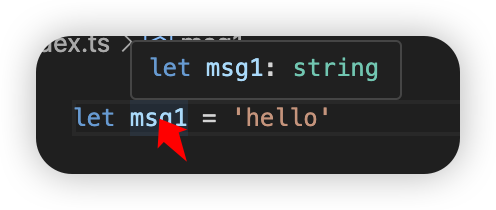
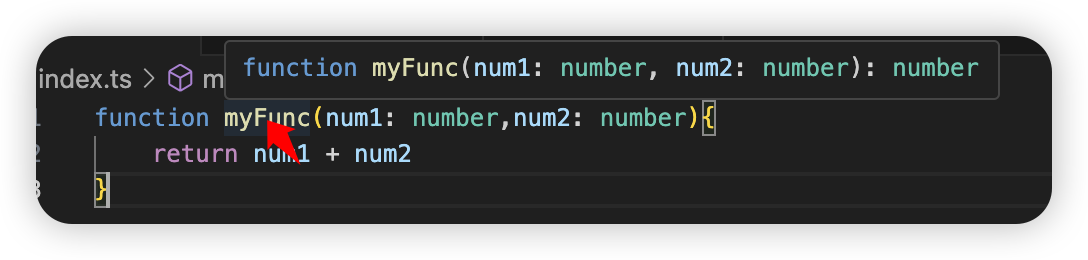
在 TS 中,某些没有明确指出类型的地方,TS 的 类型推论机制会帮助提供类型 。
字面量类型 #
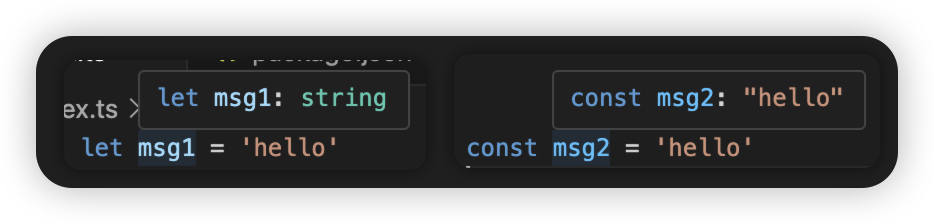
- 变量 msg1 的类型为:string。
- 因为它的值是一个string类型的任意变量
- 变量 msg2 的类型为:‘hello’。
- 因为它的值是一个常量,不可以更改,所以类型是
hello
- 因为它的值是一个常量,不可以更改,所以类型是
我们可以利用这一特性,搭配联合类型一起使用来限制方法的值
function move(to: 'top'|'bottom'|'right'|'left'){
    console.log(to)
}

move('top')
高级类型 #
Class类 #
class Person{
    // 属性
    name: string
    age = 18
    high: number = 170
    // 构造函数
    constructor(name: string,age: number,high: number){
        this.name = name
        this.age = age
        this.high = high
    }
}

var p = new Person('tom',18,180)

console.log(p)
继承 #
class Animal{
    color: string
    constructor(color: string){
        this.color = color
    }
}

class Dog extends Animal{
    name: string

    constructor(color: string,name: string){
        super(color)
        this.name = name;
    }
}

var d = new Dog('red','wangcai')

console.log(d)
实现接口 #
interface Animal{
    run(): void
}

class Dog implements Animal{
    run(): void{
        console.log("run run run")
    }
}

var d = new Dog()
d.run()
类成员可见性 #
- public(公有的)默认
- protected(受保护的)
- private(私有的)
- readonly(只读,用来防止在构造函数之外对属性进行赋值)