
什么是SpringSecurity #
Spring 是非常流行和成功的 Java 应用开发框架,Spring Security 正是 Spring 家族中的成员。Spring Security 基于 Spring 框架,提供了一套 Web 应用安全性的完整解决方案。
一般来说,Web 应用的安全性包括**用户认证(Authentication)和用户授权(Authorization)**两个部分,这两点也是 Spring Security 重要核心功能。
- 用户认证
- 验证某个用户是否为系统中的合法主体,也就是说用户能否访问该系统。用户认证一般要求用户提供用户名和密码。系统通过校验用户名和密码来完成认证过程。通俗点说就是系统认为用户是否能登录。
- 用户授权
- 用户授权指的是验证某个用户是否有权限执行某个操作。在一个系统中,不同用户所具有的权限是不同的。比如对一个文件来说,有的用户只能进行读取,而有的用户可以进行修改。一般来说,系统会为不同的用户分配不同的角色,而每个角色则对应一系列的权限。通俗点讲就是系统判断用户是否有权限去做某些事情。
SpringSecurity 特点 #
- 和 Spring 无缝整合。
- 全面的权限控制。
- 专门为 Web 开发而设计。
- 旧版本不能脱离 Web 环境使用。
- 新版本对整个框架进行了分层抽取,分成了核心模块和 Web 模块。单独引入核心模块就可以脱离 Web 环境。
- 重量级。
和Shiro的选择 #
相对于 Shiro,在 SSM 中整合 Spring Security 都是比较麻烦的操作,所以,Spring Security 虽然功能比 Shiro 强大,但是使用反而没有 Shiro 多(Shiro 虽然功能没有Spring Security 多,但是对于大部分项目而言,Shiro 也够用了)。
自从有了 Spring Boot 之后,Spring Boot 对于 Spring Security 提供了自动化配置方案,可以使用更少的配置来使用 Spring Security。
因此,一般来说,常见的安全管理技术栈的组合是这样的:
- SSM + Shiro
- Spring Boot/Spring Cloud + Spring Security
搭建环境 #
1、SpringBoot项目中添加依赖
<dependency>
    <groupId>org.springframework.boot</groupId>
    <artifactId>spring-boot-starter-security</artifactId>
</dependency>
2、编写配置类,配置类可以不用写,由SpringBoot自动配置
@Configuration
public class SecurityConfig extends WebSecurityConfigurerAdapter {
    @Override
    protected void configure(HttpSecurity http) throws Exception {
        http.formLogin() //表单登录
                .and()
                .authorizeRequests() // 认证配置
                .anyRequest() // 任何请求
                .authenticated(); // 都需要身份验证
    }
}
3、启动项目进行验证
这是SpringSecurity框架提供的默认登录密码,默认用户名为user

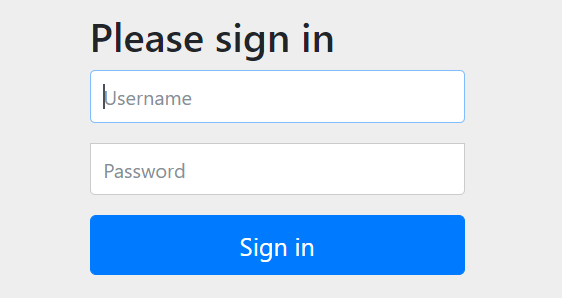
4、访问默认登陆页面(这个页面框架自带),localhost:port/login
权限管理相关概念 #
- 主体
- 英文单词:principal
- 使用系统的用户或设备或从其他系统远程登录的用户等等。简单说就是谁使用系统谁就是主体。
- 认证
- 英文单词:authentication
- 权限管理系统确认一个主体的身份,允许主体进入系统。简单说就是“主体”证明自己是谁。
- 笼统的认为就是以前所做的登录操作。
- 授权
- 英文单词:authorization
- 将操作系统的“权力”、“授予”、“主体”,这样主体就具备了操作系统中特定功能的能力。
- 所以简单来说,授权就是给用户分配权限。
底层原理 #
过滤器 #
SpringSecurity 本质是一个过滤器链
- WebAsyncManagerIntegrationFilter
- SecurityContextPersistenceFilter
- HeaderWriterFilter
- CsrfFilter
- LogoutFilter
- UsernamePasswordAuthenticationFilter
- 认证过滤器,对/login 的 POST 请求做拦截,校验表单中用户名,密码
- DefaultLoginPageGeneratingFilter
- DefaultLogoutPageGeneratingFilter
- RequestCacheAwareFilter
- SecurityContextHolderAwareRequestFilter
- AnonymousAuthenticationFilter
- SessionManagementFilter
- ExceptionTranslationFilter
- 异常过滤器,用于处理认证授权过程中抛出的异常
- FilterSecurityInterceptor
- 方法级的权限过滤器,对Controller中的方法(接口)进行权限验证, 基本位于过滤链的最底部
两个重要接口 #
UserDetailsService和UserDetails #
当什么也没有配置的时候,账号和密码是由 Spring Security 定义生成的。而在实际项目中,账号和密码都是从数据库中查询出来的。 所以我们要通过自定义逻辑控制认证逻辑。
如果需要自定义逻辑时,只需要实现 UserDetailsService 接口即可。
public class LoginUserDetailService implements UserDetailsService {
    @Override
    public UserDetails loadUserByUsername(String userName) throws UsernameNotFoundException {
        // 此处就可以从数据库根据userName查询用户信息

        // 如果没有查询到,抛出UsernameNotFoundException
        // throw new UsernameNotFoundException("用户名不存在");

        List roles = new ArrayList();
        return new User("lucy","123",true,false,false,false,null);
    }
}
注意:There is no PasswordEncoder mapped for the id "null"如果按照上面的明文存储的密码,会出现这个异常,原因是因为框架底层默认使用了密码加密器,所以如果需要明文存储,需要在密码前面加上字符串{noop}
UserDetails接口,这个接口规定了返回的用户主体,他有如下的方法,我们可以使用框架提供的User类,也可以自己实现
// 表示获取登录用户所有权限
Collection<? extends GrantedAuthority> getAuthorities();
// 表示获取密码
String getPassword();
// 表示获取用户名
String getUsername();
// 表示判断账户是否没有过期
boolean isAccountNonExpired();
// 表示判断账户是否没有被锁定
boolean isAccountNonLocked();
// 表示凭证(密码)是否没有过期
boolean isCredentialsNonExpired();
// 表示当前用户是否没有可用
boolean isEnabled();
PasswordEncoder #
这个接口用于对密码进行加密以及验证,他有如下方法
// 表示把参数按照特定的解析规则进行解析(加密)
String encode(CharSequence rawPassword);
// 表示验证从存储中获取的编码密码与编码后提交的原始密码是否匹配。如果密码匹配,则返回 true;如果不匹配,则返回 false。第一个参数表示需要被解析的密码。第二个参数表示存储的密码。
boolean matches(CharSequence rawPassword, String encodedPassword);
// 表示如果解析的密码能够再次进行解析且达到更安全的结果则返回 true,否则返回false。默认返回 false。
default boolean upgradeEncoding(String encodedPassword) {return false; }
BCryptPasswordEncoder是 Spring Security 官方推荐的密码解析器(PasswordEncoder)的实现类,平时多使用这个解析器。
BCryptPasswordEncoder 是对 bcrypt 强散列方法的具体实现。是基于 Hash 算法实现的单向加密。可以通过 strength 控制加密强度,默认10。
public static void main(String[] args) {
    BCryptPasswordEncoder encoder = new BCryptPasswordEncoder(10);
    String encode = encoder.encode("abcd@123");
    System.out.println(encode); //$2a$10$khPyohbsXmBmszXWiTY2ruinU/gFK9PrF6EPWHID7brPVmgMaqC.S
    boolean matches = encoder.matches("abcd@123", "$2a$10$khPyohbsXmBmszXWiTY2ruinU/gFK9PrF6EPWHID7brPVmgMaqC.S");
    System.out.println(matches); //true
    boolean b = encoder.upgradeEncoding("$2a$10$khPyohbsXmBmszXWiTY2ruinU/gFK9PrF6EPWHID7brPVmgMaqC.S");
    System.out.println(b); //false
}
注意:默认使用的PasswordEncoder要求数据库存储的密码格式为{id}密文,他会根据id去判断密码的加密方式,但是我们一般不会采用这种方式,所以就需要替换PasswordEncoder,我们一般使用BCryptPasswordEncoder
我们只需要将BCryptPasswordEncoder注入Spring容器,框架就会采用这种加密方式进行校验;也可以在Security的配置文件中进行配置
@Configuration
public class SecurityConfig extends WebSecurityConfigurerAdapter {
    @Bean
    public PasswordEncoder setPasswordEncoder(){
        return new BCryptPasswordEncoder(10);
    }
}
常见登录失败异常 #
// 用户名或密码错误
org.springframework.security.authentication.BadCredentialsException;
// 用户帐号已过期
org.springframework.security.authentication.AccountExpiredException;
// 用户帐号已被锁定
org.springframework.security.authentication.LockedException;
// 用户凭证()已过期
org.springframework.security.authentication.CredentialsExpiredException
// 用户已失效
org.springframework.security.authentication.DisabledException;
SpringSecurity配置类 #
编写配置类,继承WebSecurityConfigurerAdapter就可以了,可以重写方法configure对于细节进行配置
配置围绕HttpSecurity,进行链式编程
@Configuration
public class SecurityConfig extends WebSecurityConfigurerAdapter {
    @Override
    protected void configure(HttpSecurity http) throws Exception {

    }
}
配置用户名密码 #
configure的另一个重载方法可以进行配置,但是一般用不上,用户名密码都是从数据库查询
@Override
protected void configure(AuthenticationManagerBuilder auth) throws Exception {
    auth.inMemoryAuthentication()
        .withUser("root").password("1234").roles("sys")
        .and()
        .withUser("lucy").password("1234").roles("user");
}
配置拦截规则 #
@Override
protected void configure(HttpSecurity http) throws Exception {
    http
        .authorizeRequests() // 验证请求
        .antMatchers("/user").hasAnyRole("sys","admin") // user路径的请求需要具有角色sys或admin其中一种
        .antMatchers(HttpMethod.GET,"/to").permitAll() // to路径下get请求所有人都可以访问
        .anyRequest().authenticated(); //剩余的所有请求都需要验证登录
}
常见的验证规则
anyRequest          |   匹配所有请求路径
access              |   SpringEl表达式结果为true时可以访问
anonymous           |   匿名可以访问
denyAll             |   用户不能访问
fullyAuthenticated  |   用户完全认证可以访问(非remember-me下自动登录)
hasAnyAuthority     |   如果有参数,参数表示权限,则其中任何一个权限可以访问
hasAnyRole          |   如果有参数,参数表示角色,则其中任何一个角色可以访问
hasAuthority        |   如果有参数,参数表示权限,则其权限可以访问
hasIpAddress        |   如果有参数,参数表示IP地址,如果用户IP和参数匹配,则可以访问
hasRole             |   如果有参数,参数表示角色,则其角色可以访问
permitAll           |   用户可以任意访问
rememberMe          |   允许通过remember-me登录的用户访问
authenticated       |   用户登录后可访问
Authority权限和Role角色的区别:
区别就是Role在验证的时候会自动给传入的字符串加上 ROLE_ 前缀,所以在数据库中的权限字符串需要加上 ROLE_ 前缀;而Authority不会这样。
添加自定义过滤器 #
例如我们需要在内置UsernamePasswordAuthenticationFilter前面添加一个自定义的token校验过滤器,如果校验完成,后面就不需要再进行账号合法性校验
@Override
protected void configure(HttpSecurity http) throws Exception {
    // 配置在内置用户名密码认证过滤器之前
    http.addFilterBefore(tokenAuthFilter, UsernamePasswordAuthenticationFilter.class);
}
重要的内置对象 #
SecurityContextHolder #
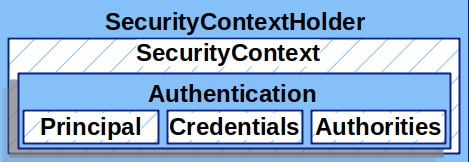
这里我们存储应用程序当前安全上下文的详细信息,其中包括当前使用应用程序的主体的详细信息。SecurityContextHolder使用ThreadLocal去存储这些详细信息,这意味着安全上下文始终可用于同一执行线程中的方法,即使安全上下文没有作为参数显式传递给这些方法。
通过方法getContext(),我们可以获得一个SecurityContext对象
SecurityContext #
存储认证授权的相关信息,实际上就是存储当前用户(主体)账号信息和相关权限。这个接口只有两个方法,Authentication对象的getter、setter。
我们可以在过滤链的任意一环,使用context.setAuthentication();方法设置Authentication认证对象,在后续的过滤链中,都可以获取使用,查看用户是否认证、权限、角色等信息。
Authentication #
认证(主体)对象,主要作用有:
- 作为后续验证的入参
- 获取当前验证通过的用户信息
三个属性:
- principal:用户身份,如果是用户/密码认证,这个属性就是UserDetails实例
- credentials:通常就是密码,在大多数情况下,在用户验证通过后就会被清除,以防密码泄露。
- authorities:用户权限
常用的实现类有UsernamePasswordAuthenticationToken
AuthenticationManager #
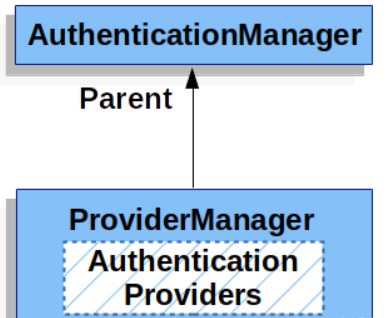
- AuthenticationManager是用来实现身份认证的API接口,我们可以主动调用该对象中的
authenticate对Authentication进行认证,最常用的子类是ProviderManager - AuthenticationProvider是某种具体的认证实现,例如DaoAuthenticationProvider用来实现用户/密码认证,JwtAuthenticationProvider实现JWT Token认证
- 支持多种类型AuthenticationProvider会注入到ProviderManager中,ProviderManager会根据Authentication的类型调用相应类型的AuthenticationProvider
授权 #
- 一共有两种方式可以设置
- 基于配置:在SecurityConfig中进行配置,比较麻烦,不容易控制
- 基于注解:在Controller方法上添加注解来控制
基于注解 #
在SecurityConfig类上添加注解,开启注解配置
@EnableGlobalMethodSecurity(prePostEnabled = true)
在需要权限控制的Controller方法添加注解即可
@GetMapping("/test")
@PreAuthorize("hasAnyAuthority('sys','admin')")
public String test(){
    return "test";
}
自定义失败处理 #
如果希望在认证失败或授权失败的时候,也可以对请求返回自定义响应,而不是只是在后台抛出异常的话,那么我们可以自定义统一处理机制,在框架内部有如下机制:
认证过程失败:会出现AuthenticationException,使用AuthenticationEntryPoint进行处理
授权过程失败:会抛出AccessDeniedException,使用AccessDeniedHandler进行处理
所以,如果我们需要自定义处理机制的话,只需要实现AuthenticationEntryPoint和AccessDeniedHandler并配置给SecurityConfig就可以了
@Component
public class AuthenticationEntryPointImpl implements AuthenticationEntryPoint {
    @Override
    public void commence(HttpServletRequest httpServletRequest, HttpServletResponse httpServletResponse, AuthenticationException e) throws IOException, ServletException {
        ResultVO<Object> result = ResultVO.result("认证失败或已在别处登录,请进行登录", ResultCode.UNAUTHORIZED, null);
        String jsonString = JSON.toJSONString(result);
        httpServletResponse.setHeader("Content-Type","application/json;charset=utf-8");
        httpServletResponse.getWriter().write(jsonString);
    }
}
@Component
public class AccessDeniedHandlerImpl implements AccessDeniedHandler {
    @Override
    public void handle(HttpServletRequest httpServletRequest, HttpServletResponse httpServletResponse, AccessDeniedException e) throws IOException, ServletException {
        ResultVO<Object> result = ResultVO.result("无权限进行此操作", ResultCode.NOACCESS, null);
        String jsonString = JSON.toJSONString(result);
        httpServletResponse.setHeader("Content-Type","application/json;charset=utf-8");
        httpServletResponse.getWriter().write(jsonString);
    }
}
配置到SecurityConfig
@Configuration
@EnableGlobalMethodSecurity(prePostEnabled = true)
public class SecurityConfig extends WebSecurityConfigurerAdapter {
    @Autowired
    private AuthenticationEntryPointImpl authenticationEntryPoint;
    @Autowired
    private AccessDeniedHandlerImpl accessDeniedHandler;

    @Override
    protected void configure(HttpSecurity http) throws Exception {
        // 配置认证和授权失败过滤器
        http.exceptionHandling()
                .authenticationEntryPoint(authenticationEntryPoint)
                .accessDeniedHandler(accessDeniedHandler);
    }
}