
Swagger在线文档技术 #
- 现在来讲,最主流的开发模式:前后端分离
- 前端编写页面,以及完成后端接口的调用
- 后端:提供数据接口,以及需要提交接口所对应的接口文档
参照的示例 #
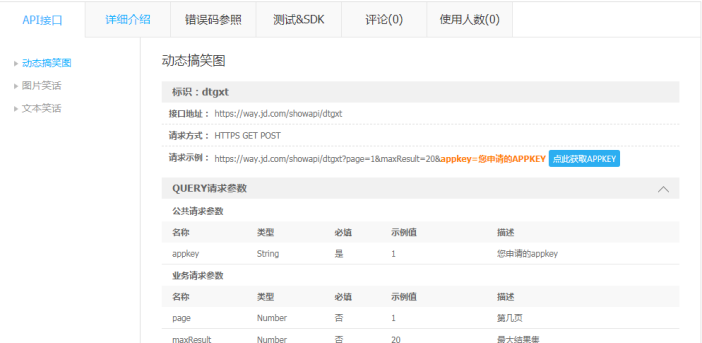
文档,要么是以网站的方式,或者以Word文档的方式存在,一定不是以“嘴遁”的方式存在。但是这就对后端程序员,增加了额外的工作量
在线文档 #
- 后端人员只需在Java代码写点注解,对应的框架就可以自动生成相关的接口文档描述
- Swagger就是这样的技术
使用 #
依赖 #
<!--接口文档自动生成-->
<dependency>
   <groupId>io.springfox</groupId>
   <artifactId>springfox-boot-starter</artifactId>
   <version>3.0.0</version>
</dependency>
配置文件 #
swagger:
  enable: true
  application-name: ${spring.application.name}
  application-version: 1.0.0
  application-description: 项目描述
  name: ===
  url: ===
  email: ===
配置类 #
/**
 * @描述
 * @创建人 yhgh
 * @创建时间 2023/11/3 10:08
 */
@Configuration
@Data
@ConfigurationProperties("swagger")  // 读取配置文件
@EnableOpenApi   // 启动OpenApi
public class SwaggerConfiguration {
    /**
     * 是否开启swagger,生产环境一般关闭,所以这里定义一个变量
     */
    private Boolean enable;
    /**
     * 项目应用名
     */
    private String applicationName;
    /**
     * 项目版本信息
     */
    private String applicationVersion;
    /**
     * 项目描述信息
     */
    private String applicationDescription;

    /**
     * 姓名
     */
    private String name;

    /**
     * 网址
     */
    private String url;

    /**
     * 邮箱
     */
    private String email;

    @Bean
    public Docket docket() {
        return new Docket(DocumentationType.OAS_30)

                .pathMapping("/")

                // 定义是否开启swagger,false为关闭,可以通过变量控制,线上关闭
                .enable(enable)

                //配置api文档元信息
                .apiInfo(apiInfo())

                // 选择哪些接口作为swagger的doc发布
                .select()

                // .apis() 控制哪些接口暴露给swagger,
                // RequestHandlerSelectors.any() 所有都暴露
                // RequestHandlerSelectors.basePackage("top.ygang.*")  指定包位置
                // withMethodAnnotation(ApiOperation.class) 标记有这个注解ApiOperation

                .apis(RequestHandlerSelectors.withMethodAnnotation(ApiOperation.class))

                .paths(PathSelectors.any())

                .build();

    }

    private ApiInfo apiInfo() {
        return new ApiInfoBuilder()
                .title(applicationName)
                .description(applicationDescription)
                .contact(new Contact("测试swagger", "https://www.baidu.com", "444012836@qq.com"))
                .version(applicationVersion)
                .build();
    }
}
注解 #
//对类声明
@Api(value = "测试接口", tags = "用户管理相关的接口", description = "用户测试接口")
//对方法声明
@ApiOperation(value = "添加用户", notes = "添加用户")
//对参数声明
@ApiImplicitParam(name = "s", value = "新增用户数据")
//多参数声明
@ApiImplicitParams({
    @ApiImplicitParam(name = "emp", value = "人员对象,需要有账号和密码"),
    @ApiImplicitParam(name = "1111", value = "人员对象,需要有账号和密码")
})
跨域问题 #
@Override
public void addResourceHandlers(ResourceHandlerRegistry registry) {
    registry.addResourceHandler("swagger-ui.html")
        .addResourceLocations("classpath:/META-INF/resources/");
    registry.addResourceHandler("/webjars/**")
        .addResourceLocations("classpath:/META-INF/resources/webjars/");
}