
Pandas #
Python的Pandas是一个基于Python构建的开源数据分析库,它提供了强大的数据结构和运算功能。
Pandas 名字衍生自术语 “panel data”(面板数据)和 “Python data analysis"(Python 数据分析)。
Pandas 是一个开放源码、BSD 许可的库,提供高性能、易于使用的数据结构和数据分析工具。
Pandas 一个强大的分析结构化数据的工具集,基础是Numpy(提供高性能的矩阵运算)。
Pandas 应用 #
Pandas 可以从各种文件格式比如 CSV、JSON、SQL、Microsoft Excel 导入数据。
Pandas 可以对各种数据进行运算操作,比如归并、再成形、选择,还有数据清洗和数据加工特征。
Pandas 广泛应用在学术、金融、统计学等各个数据分析领域。
数据结构 #
Pandas 的主要数据结构是 Series (一维数据)与 DataFrame(二维数据)。
- Series是一种类似于一维数组的对象,它由一组数据(各种 Numpy 数据类型)以及一组与之相关的数据标签(即索引)组成。
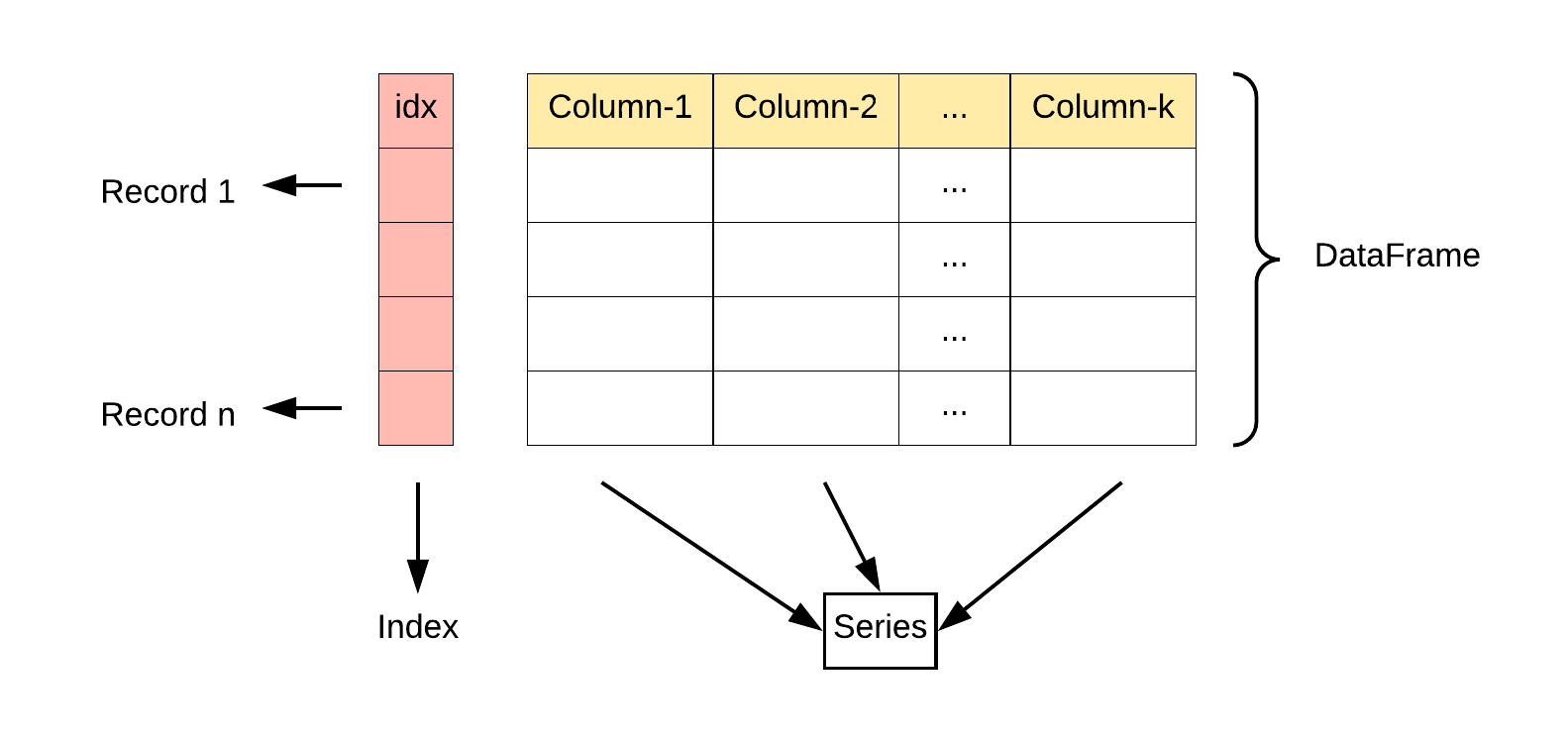
- DataFrame是一个表格型的数据结构,它含有一组有序的列,每列可以是不同的值类型(数值、字符串、布尔型值)。DataFrame 既有行索引也有列索引,它可以被看做由 Series 组成的字典(共同用一个索引)。
安装 #
pip install pandas
查看 pandas 版本 #
import pandas as pd

print(pd.__version__)
简单实例 #
import pandas as pd

data = {
    'Name': ['lucy','tom','lily'],
    'Age': [18,20,35]
}

df = pd.DataFrame(data)

print(df)

>>>

   Name  Age
0  lucy   18
1   tom   20
2  lily   35
Series #
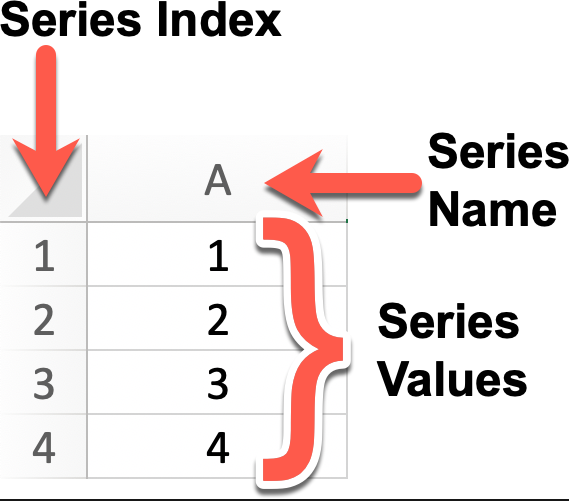
Series: 类似于一维数组或列表,是由一组数据以及与之相关的数据标签(索引)构成。Series 可以看作是 DataFrame 中的一列,也可以是单独存在的一维数据结构。
Series 特点:
- **一维数组:**Series 中的每个元素都有一个对应的索引值。
- 索引: 每个数据元素都可以通过标签(索引)来访问,默认情况下索引是从 0 开始的整数,但你也可以自定义索引。
- 数据类型:
Series可以容纳不同数据类型的元素,包括整数、浮点数、字符串、Python 对象等。 - **大小不变性:**Series 的大小在创建后是不变的,但可以通过某些操作(如 append 或 delete)来改变。
- **操作:**Series 支持各种操作,如数学运算、统计分析、字符串处理等。
- **缺失数据:**Series 可以包含缺失数据,Pandas 使用NaN(Not a Number)来表示缺失或无值。
- **自动对齐:**当对多个 Series 进行运算时,Pandas 会自动根据索引对齐数据,这使得数据处理更加高效。
我们可以使用 Pandas 库来创建一个 Series 对象,并且可以为其指定索引(Index)、名称(Name)以及值(Values)
import pandas as pd

# 创建 Series,使用默认索引
s1 = pd.Series(['tom','lucy','lily'],name='s1')
print(s1)
>>>
0     tom
1    lucy
2    lily
Name: s1, dtype: object

# 创建 Series,使用自定义索引
s2 = pd.Series(['tom','lucy','lily'],index=['stu-1','stu-2','stu-3'],name='s2')
print(s2)
>>>
stu-1     tom
stu-2    lucy
stu-3    lily
Name: s2, dtype: object
创建 Series #
可以使用 pd.Series() 构造函数创建一个 Series 对象,传递一个数据数组(可以是列表、NumPy 数组等)和一个可选的索引数组。
pandas.Series(data=None, index=None, dtype=None, name=None, copy=False, fastpath=False)
参数说明:
data:Series 的数据部分,可以是列表、数组、字典、标量值等。如果不提供此参数,则创建一个空的 Series。index:Series 的索引部分,用于对数据进行标记。可以是列表、数组、索引对象等。如果不提供此参数,则创建一个默认的整数索引。dtype:指定 Series 的数据类型。可以是 NumPy 的数据类型,例如np.int64、np.float64等。如果不提供此参数,则根据数据自动推断数据类型。name:Series 的名称,用于标识 Series 对象。如果提供了此参数,则创建的 Series 对象将具有指定的名称。copy:是否复制数据。默认为 False,表示不复制数据。如果设置为 True,则复制输入的数据。fastpath:是否启用快速路径。默认为 False。启用快速路径可能会在某些情况下提高性能。
除了上面的使用 list 创建,还可以使用字典创建,字典的 key 将会成为索引
import pandas as pd

data = {'stu-1': 'tom','stu-2': 'lucy','stu-3': 'lily'}

s1 = pd.Series(data)

print(s1)

>>>
stu-1     tom
stu-2    lucy
stu-3    lily
dtype: object
如果只需要字典中的部分数据,可以在使用 index 传入需要的索引
s1 = pd.Series(data,index=['stu-1','stu-2'])
Series 方法 #
| 方法名称 | 功能描述 |
|---|---|
index |
获取 Series 的索引 |
values |
获取 Series 的数据部分(返回 NumPy 数组) |
head(n) |
返回 Series 的前 n 行(默认为 5) |
tail(n) |
返回 Series 的后 n 行(默认为 5) |
dtype |
返回 Series 中数据的类型 |
shape |
返回 Series 的形状(行数) |
describe() |
返回 Series 的统计描述(如均值、标准差、最小值等) |
isnull() |
返回一个布尔 Series,表示每个元素是否为 NaN |
notnull() |
返回一个布尔 Series,表示每个元素是否不是 NaN |
unique() |
返回 Series 中的唯一值(去重) |
value_counts() |
返回 Series 中每个唯一值的出现次数 |
map(func) |
将指定函数应用于 Series 中的每个元素 |
apply(func) |
将指定函数应用于 Series 中的每个元素,常用于自定义操作 |
astype(dtype) |
将 Series 转换为指定的类型 |
sort_values() |
对 Series 中的元素进行排序(按值排序) |
sort_index() |
对 Series 的索引进行排序 |
dropna() |
删除 Series 中的缺失值(NaN) |
fillna(value) |
填充 Series 中的缺失值(NaN) |
replace(to_replace, value) |
替换 Series 中指定的值 |
cumsum() |
返回 Series 的累计求和 |
cumprod() |
返回 Series 的累计乘积 |
shift(periods) |
将 Series 中的元素按指定的步数进行位移 |
rank() |
返回 Series 中元素的排名 |
corr(other) |
计算 Series 与另一个 Series 的相关性(皮尔逊相关系数) |
cov(other) |
计算 Series 与另一个 Series 的协方差 |
to_list() |
将 Series 转换为 Python 列表 |
to_frame() |
将 Series 转换为 DataFrame |
iloc[] |
通过位置索引来选择数据 |
loc[] |
通过标签索引来选择数据 |
import pandas as pd

data = [1,2,3,4,None,6,7]
index = ['a','b','c','d','e','f','g']

s = pd.Series(data,index=index)

# 基本信息
print('索引:',s.index)
print('\n数据:',s.values)
print('\n数据类型:',s.dtype)
print('\n前两行数据:\n',s.head(2))

# 使用 map 函数对每个元素进行操作,并生成新 Series
s_double = s.map(lambda x: x * 2)
print(s_double)

# 求和
print("\n求和:",s.cumsum)

# 查找缺失值
print("\n缺失值:\n",s.isnull())

# 排序
sorted_s = s.sort_values()
print("\n排序后:\n",sorted_s)
输出结果如下
索引: Index(['a', 'b', 'c', 'd', 'e', 'f', 'g'], dtype='object')

数据: [ 1.  2.  3.  4. nan  6.  7.]

数据类型: float64

前两行数据:
 a    1.0
b    2.0
dtype: float64
a     2.0
b     4.0
c     6.0
d     8.0
e     NaN
f    12.0
g    14.0
dtype: float64

求和: <bound method Series.cumsum of a    1.0
b    2.0
c    3.0
d    4.0
e    NaN
f    6.0
g    7.0
dtype: float64>

缺失值:
 a    False
b    False
c    False
d    False
e     True
f    False
g    False
dtype: bool

排序后:
 a    1.0
b    2.0
c    3.0
d    4.0
f    6.0
g    7.0
e    NaN
dtype: float64
基本操作 #
# 使用列表创建 Series
s = pd.Series([1, 2, 3, 4])

# 使用 NumPy 数组创建 Series
s = pd.Series(np.array([1, 2, 3, 4]))

# 使用字典创建 Series
s = pd.Series({'a': 1, 'b': 2, 'c': 3, 'd': 4})

# 指定索引创建 Series
s = pd.Series([1, 2, 3, 4], index=['a', 'b', 'c', 'd'])

# 获取值
value = s[2]  # 获取索引为2的值

# 获取多个值
subset = s[1:4]  # 获取索引为1到3的值

# 使用自定义索引
value = s['b']  # 获取索引为'b'的值

# 索引和值的对应关系
for index, value in s.items():
    print(f"Index: {index}, Value: {value}")


# 使用切片语法来访问 Series 的一部分
print(s['a':'c'])  # 返回索引标签 'a' 到 'c' 之间的元素
print(s[:3])  # 返回前三个元素

# 为特定的索引标签赋值
s['a'] = 10  # 将索引标签 'a' 对应的元素修改为 10

# 通过赋值给新的索引标签来添加元素
s['e'] = 5  # 在 Series 中添加一个新的元素,索引标签为 'e'

# 使用 del 删除指定索引标签的元素。
del s['a']  # 删除索引标签 'a' 对应的元素

# 使用 drop 方法删除一个或多个索引标签,并返回一个新的 Series。
s_dropped = s.drop(['b'])  # 返回一个删除了索引标签 'b' 的新 Series
s.drop(['b'] ,inplace=True)  # 在原有 Series 上删除了索引标签 'b'
算数运算 #
# 算术运算
result = series * 2  # 所有元素乘以2

# 过滤
filtered_series = series[series > 2]  # 选择大于2的元素

# 数学函数
import numpy as np
result = np.sqrt(series)  # 对每个元素取平方根
计算统计数据 #
print(s.sum())  # 输出 Series 的总和
print(s.mean())  # 输出 Series 的平均值
print(s.max())  # 输出 Series 的最大值
print(s.min())  # 输出 Series 的最小值
print(s.std())  # 输出 Series 的标准差
使用布尔表达式:根据条件过滤 Series #
import pandas as pd

data = [1,2,3,4,None,6,7]
index = ['a','b','c','d','e','f','g']

s = pd.Series(data,index=index)

print(s > 3) # 返回一个布尔 Series,其中的元素值大于3

>>>
a    False
b    False
c    False
d     True
e    False
f     True
g     True
dtype: bool
转换数据类型 #
s = s.astype('float64') # 将 Series 中的所有元素转换为 float64 类型
DataFrame #
DataFrame: 类似于一个二维表格,它是 Pandas 中最重要的数据结构。DataFrame 可以看作是由多个 Series 按列排列构成的表格,它既有行索引也有列索引,因此可以方便地进行行列选择、过滤、合并等操作。
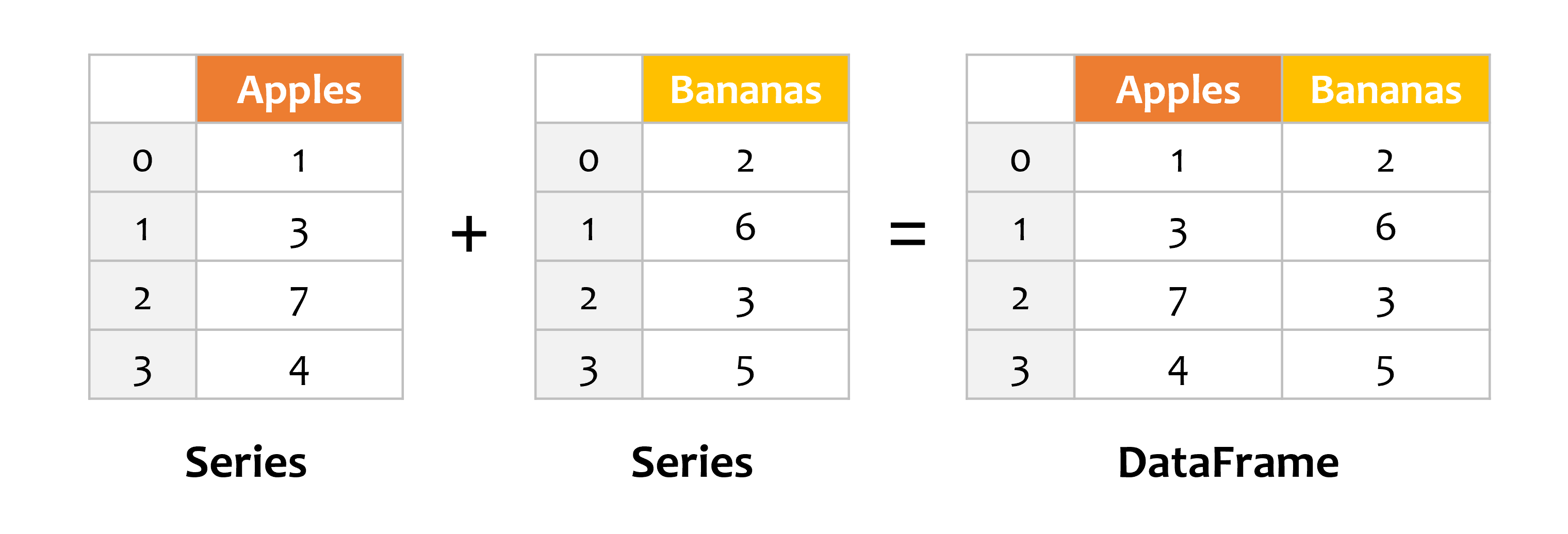
DataFrame 可视为由多个 Series 组成的数据结构:
Series 组成了 DataFrame #
import pandas as pd

s1 = pd.Series([1,3,7,4])
s2 = pd.Series([2,6,3,5])

df = pd.DataFrame({
    'Apples': s1,
    'Bananas': s2
})

print(df)

>>>
   Apples  Bananas
0       1        2
1       3        6
2       7        3
3       4        5
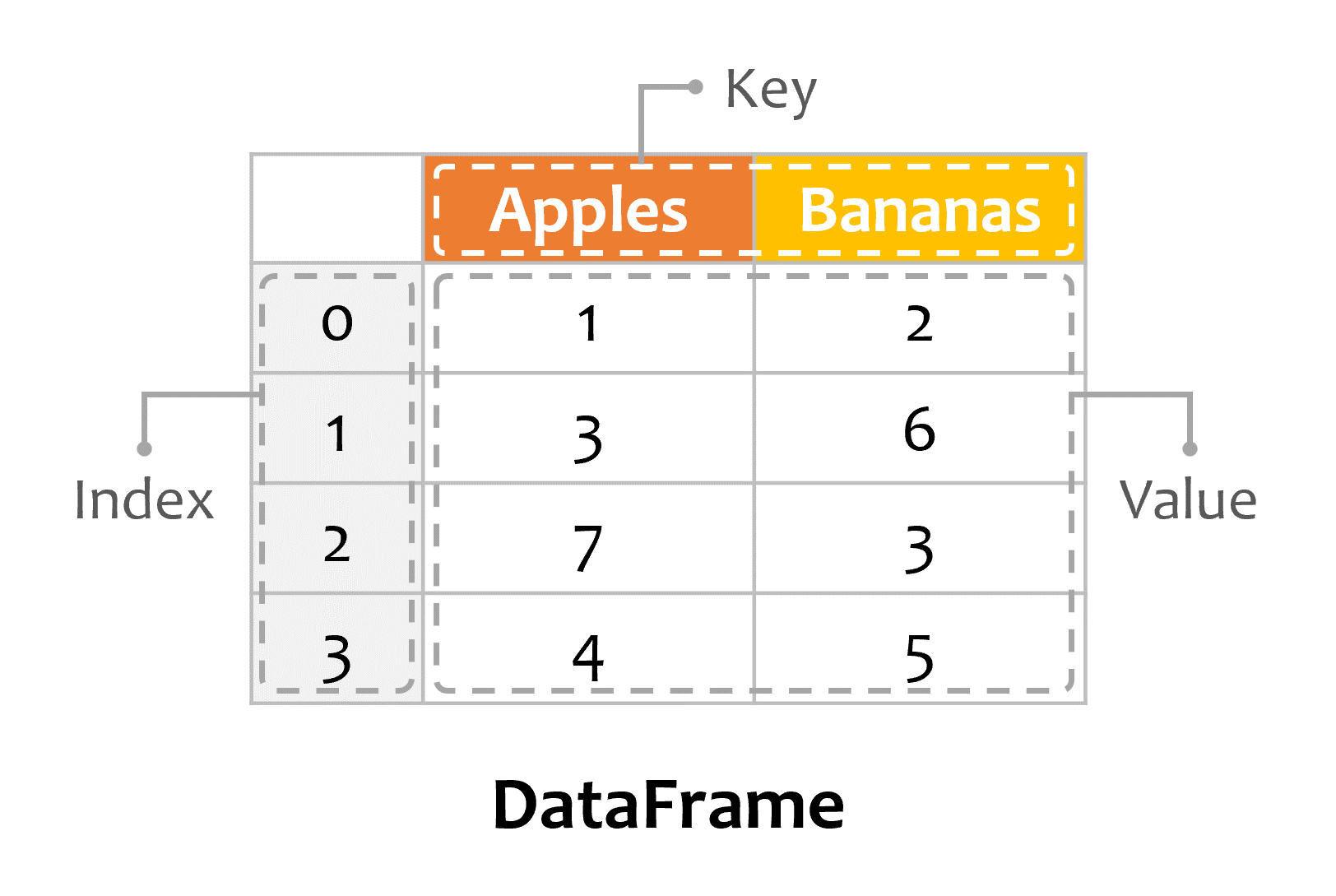
DataFrame 由 Index、Key、Value 组成:
创建DataFrame #
pandas.DataFrame(data=None, index=None, columns=None, dtype=None, copy=False)
参数说明:
data:DataFrame 的数据部分,可以是字典、二维数组、Series、DataFrame 或其他可转换为 DataFrame 的对象。如果不提供此参数,则创建一个空的 DataFrame。index:DataFrame 的行索引,用于标识每行数据。可以是列表、数组、索引对象等。如果不提供此参数,则创建一个默认的整数索引。columns:DataFrame 的列索引,用于标识每列数据。可以是列表、数组、索引对象等。如果不提供此参数,则创建一个默认的整数索引。dtype:指定 DataFrame 的数据类型。可以是 NumPy 的数据类型,例如np.int64、np.float64等。如果不提供此参数,则根据数据自动推断数据类型。copy:是否复制数据。默认为 False,表示不复制数据。如果设置为 True,则复制输入的数据。
使用 list 创建时,内部的每个数组是一行
import pandas as pd

data = [
    ['Google',10],
    ['Runob',12],
    ['Wiki',16]
]
# 创建DataFrame
df = pd.DataFrame(data,columns=['Site','Age'])
# 使用astype方法设置每列的数据类型
df['Site'] = df['Site'].astype(str)
df['Age'] = df['Age'].astype(float)

print(df)

>>>
     Site   Age
0  Google  10.0
1   Runob  12.0
2    Wiki  16.0
使用 dict 创建时,key 作为每一列的 title,value 作为每一列的值
import pandas as pd

data = {
    'Site': ['Google','Runob','Wiki'],
    'Age': [10,12,16]
}

df = pd.DataFrame(data,columns=['Site','Age'])

df['Site'] = df['Site'].astype(str)
df['Age'] = df['Age'].astype(float)

print(df)

>>>
     Site   Age
0  Google  10.0
1   Runob  12.0
2    Wiki  16.0
也可以使用一个 list[dict]来创建
import pandas as pd

data = [
    {'Site':'Google','Age':10},
    {'Site':'Runob','Age':12},
    {'Site':'Wiki','Age':16},
]

df = pd.DataFrame(data,columns=['Site','Age'])

df['Site'] = df['Site'].astype(str)
df['Age'] = df['Age'].astype(float)

print(df)
>>>
     Site   Age
0  Google  10.0
1   Runob  12.0
2    Wiki  16.0
DataFrame 方法 #
| 方法名称 | 功能描述 |
|---|---|
head(n) |
返回 DataFrame 的前 n 行数据(默认前 5 行) |
tail(n) |
返回 DataFrame 的后 n 行数据(默认后 5 行) |
info() |
显示 DataFrame 的简要信息,包括列名、数据类型、非空值数量等 |
describe() |
返回 DataFrame 数值列的统计信息,如均值、标准差、最小值等 |
shape |
返回 DataFrame 的行数和列数(行数, 列数) |
columns |
返回 DataFrame 的所有列名 |
index |
返回 DataFrame 的行索引 |
dtypes |
返回每一列的数值数据类型 |
sort_values(by) |
按照指定列排序 |
sort_index() |
按行索引排序 |
dropna() |
删除含有缺失值(NaN)的行或列 |
fillna(value) |
用指定的值填充缺失值 |
isnull() |
判断缺失值,返回一个布尔值 DataFrame |
notnull() |
判断非缺失值,返回一个布尔值 DataFrame |
loc[] |
按标签索引选择数据 |
iloc[] |
按位置索引选择数据 |
at[] |
访问 DataFrame 中单个元素(比 loc[] 更高效) |
iat[] |
访问 DataFrame 中单个元素(比 iloc[] 更高效) |
apply(func) |
对 DataFrame 或 Series 应用一个函数 |
applymap(func) |
对 DataFrame 的每个元素应用函数(仅对 DataFrame) |
groupby(by) |
分组操作,用于按某一列分组进行汇总统计 |
pivot_table() |
创建透视表 |
merge() |
合并多个 DataFrame(类似 SQL 的 JOIN 操作) |
concat() |
按行或按列连接多个 DataFrame,axis=0默认,按行连接,axis=1表示按列合并 |
to_csv() |
将 DataFrame 导出为 CSV 文件 |
to_excel() |
将 DataFrame 导出为 Excel 文件 |
to_json() |
将 DataFrame 导出为 JSON 格式 |
to_sql() |
将 DataFrame 导出为 SQL 数据库 |
query() |
使用 SQL 风格的语法查询 DataFrame |
duplicated() |
返回布尔值 DataFrame,指示每行是否是重复的 |
drop_duplicates() |
删除重复的行 |
set_index() |
设置 DataFrame 的索引 |
reset_index() |
重置 DataFrame 的索引 |
transpose() |
转置 DataFrame(行列交换) |
import pandas as pd

# 创建 DataFrame
data = {
    'Name': ['Alice', 'Bob', 'Charlie', 'David'],
    'Age': [25, 30, 35, 40],
    'City': ['New York', 'Los Angeles', 'Chicago', 'Houston']
}
df = pd.DataFrame(data)

# 查看前两行数据
print(df.head(2))

# 查看 DataFrame 的基本信息
print(df.info())

# 获取描述统计信息
print(df.describe())

# 按年龄排序
df_sorted = df.sort_values(by='Age', ascending=False)
print(df_sorted)

# 选择指定列
print(df[['Name', 'Age']])

# 按索引选择行
print(df.iloc[1:3])  # 选择第二到第三行(按位置)

# 按标签选择行
print(df.loc[1:2])  # 选择第二到第三行(按标签)

# 计算分组统计(按城市分组,计算平均年龄)
print(df.groupby('City')['Age'].mean())

# 处理缺失值(填充缺失值)
df['Age'] = df['Age'].fillna(30)

# 导出为 CSV 文件
df.to_csv('output.csv', index=False)
基本操作 #
# 通过列名访问
print(df['Column1'])
print(df.Column1)

# 通过 .loc[] 访问
print(df.loc[:, 'Column1'])  # 访问第Column1列的全部行

# 通过 .iloc[] 访问
print(df.iloc[:, 0])  # 访问第1列的全部行

# 访问单个元素
print(df['Name'][0]) # 访问Name列的第一行的元素

# 修改列数据:直接对列进行赋值。
df['Column1'] = [10, 11, 12]

# 添加新列:给新列赋值。
df['NewColumn'] = [100, 200, 300]

# 添加新行:使用 loc、append(弃用) 或 concat 方法。
# 使用 loc 为特定索引添加新行
df.loc[3] = [13, 14, 15, 16]

# 使用 append 添加新行到末尾
new_row = {'Column1': 13, 'Column2': 14, 'NewColumn': 16}
df = df.append(new_row, ignore_index=True)

# 使用concat添加新行
new_row = pd.DataFrame([[4, 7]], columns=['A', 'B'])  # 创建一个只包含新行的DataFrame
df = pd.concat([df, new_row], ignore_index=True)  # 将新的行 new_row 追加在 df 后面

# 删除 DataFrame 元素
# 删除列:使用 drop 方法。
df_dropped = df.drop('Column1', axis=1)
# 删除行:同样使用 drop 方法。
df_dropped = df.drop(0, axis=0)  # 删除索引为 0 的行
DataFrame 的合并与分割 #
# 纵向合并
pd.concat([df1, df2], ignore_index=True)

# 横向合并
pd.merge(df1, df2, on='Column1')
详解DataFrame的loc和iloc #
其实记住字符串索引用loc,整数索引用iloc就行了。
df.loc[row_indexer, column_indexer]
df.iloc[row_indexer, column_indexer]
区别就在于,loc 的索引值可以用字符串,但是 iloc 的索引值只能用整数
import pandas as pd

data = {'name': ['Alice', 'Bob', 'Charlie'],
        'age': [25, 30, 35],
        'city': ['New York', 'London', 'Paris']}
df = pd.DataFrame(data, index=['a', 'b', 'c'])
row_a = df.loc['a']
import pandas as pd

data = {'name': ['Alice', 'Bob', 'Charlie'],
        'age': [25, 30, 35],
        'city': ['New York', 'London', 'Paris']}
df = pd.DataFrame(data)
row_0 = df.iloc[0]
迭代每一行 #
如果你需要更细致地控制每一行的处理过程,可以使用 iterrows 或 itertuples 遍历每一行。
mport pandas as pd

# 创建一个示例 DataFrame
data = {'A': [1, 2, 3], 'B': [4, 5, 6]}
df = pd.DataFrame(data)

# 遍历每一行,处理并新增列
for index, row in df.iterrows():
    df.loc[index, 'C'] = row['A'] + row['B']
    df.loc[index, 'D'] = row['A'] * row['B']

print(df)